
Fair for both sides of the screen
Hourly VA work runs on trust in both directions. The owner needs to know the hours are real. The VA needs to know they are not being spied on. TrustHours is built for both.
Set up your VA team in four steps
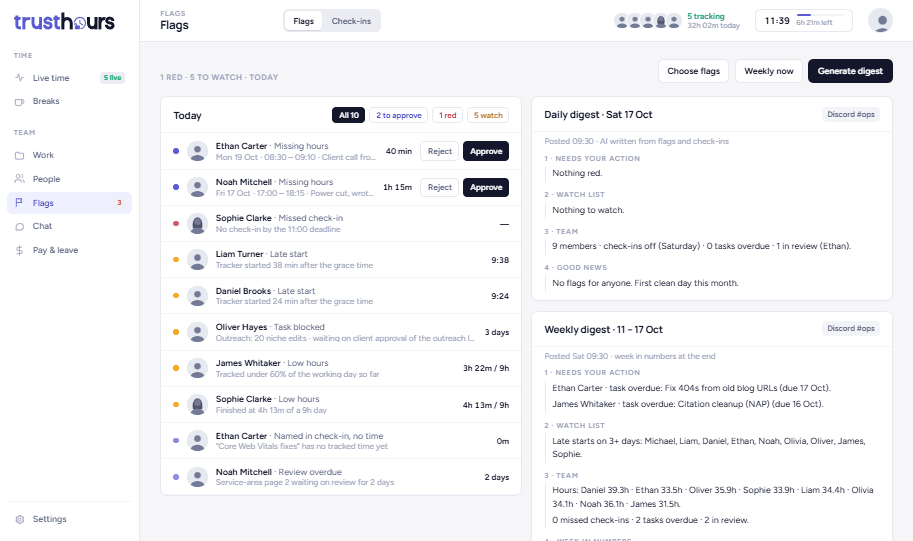
Across time zones, the problems come to you
When your team works while you sleep, you should not have to scroll through a day of screenshots to know if something went wrong.
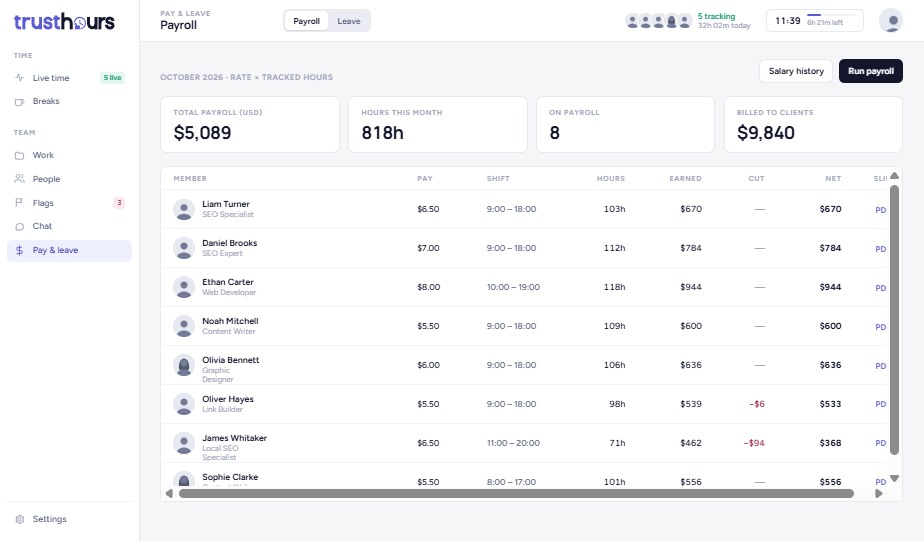
Pay VAs from the hours they tracked
Payroll reads the same hours your VAs tracked, so there is no spreadsheet in between.
One laptop, two clients
It is one of the most common questions in VA communities: if I work for two clients on one laptop, will this client’s tracker see the other client’s work?
With TrustHours the answer is simple. Nothing is captured unless the timer is running. A VA pauses or stops tracking before switching to another client, and nothing is recorded until they start again. Owners can also list apps that should always be skipped or blurred.
What it costs for a VA team
Team plan, billed monthly, only for active users. The Free plan covers up to 3 users with screenshots every 10 minutes; payroll, projects and chat start on Team.
The first 20 teams to subscribe keep the launch price for as long as they stay subscribed. See all plans
Questions
Do VAs need admin rights to install TrustHours?+
No. The Windows app installs for the current user only, in about 2 minutes, with no admin password. VAs sign in with the email they were invited with and can start tracking straight away.
Can a VA see their own screenshots?+
Yes. Every person has their own view of their day, their screenshots, their hours and their activity, so a VA sees exactly what the owner sees about them.
Are breaks and idle time paid?+
Lunch and tea breaks are paid and nothing is captured during them. If there is no keyboard or mouse activity for 5 minutes, the timer pauses itself and idle time is never billed.
Does TrustHours work on a Mac?+
The tracking app runs on Windows today and a macOS app is in progress. Owners and managers use the dashboard in any browser, so only the VAs being tracked need Windows.
Can I track my VAs for free?+
Yes, for up to 3 users. The Free plan includes the desktop app, the live team board, timesheets, screenshots every 10 minutes, and lunch and tea breaks. Payroll, projects and chat are on the Team plan.
Give your VA team a tracker they can trust.
14 days free. No card needed.